Fotocast - Weather Forecast fo
Dunbar Technology, LLCWeather
3.975.00 Reviews
- Version
- 3.4.5
- Installs
- 10.00K
- Age Rating
- Everyone
Screenshots
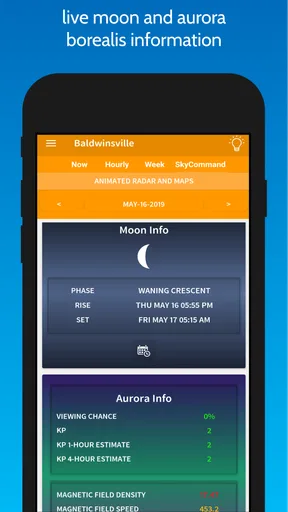
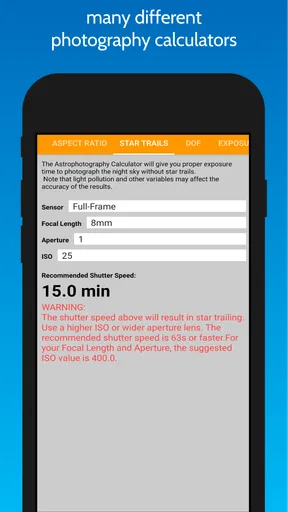
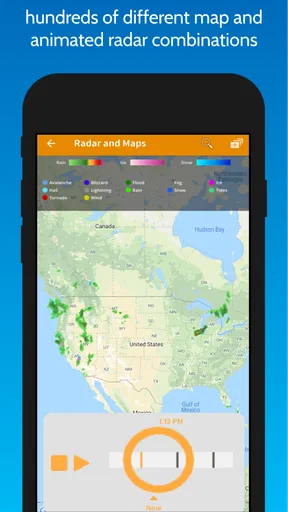
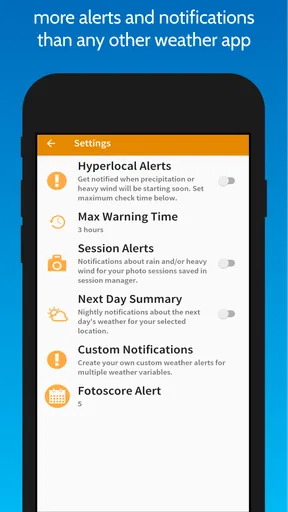
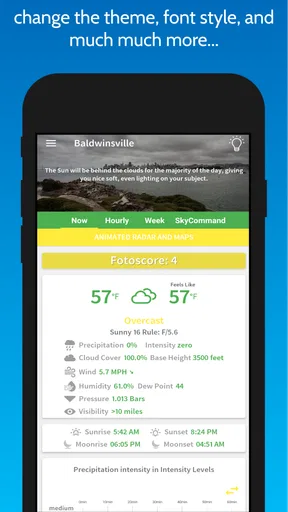
Our Review of Fotocast - Weather Forecast fo
 Analysis by Appyee
Weather apps usually try to answer one question: will it rain? Fotocast takes a more focused approach. It is a free weather app from Dunbar Technology, LLC, built for people who need to decide whether the sky, light, and timing are worth taking a camera outside. After using it as a planning tool rather than merely a forecast screen, I found that its value depends less on checking it once and more on building a repeatable habit around it.
That distinction matters. A general weather service is often better when I need radar, warnings, broad regional coverage, or a quick answer before leaving home. Fotocast makes more sense when the forecast is part of a creative decision: whether to carry a tripod, wait for better light, revisit a location, or avoid spending an hour traveling for a flat and unsuitable scene.
How I use Fotocast before taking a camera outside
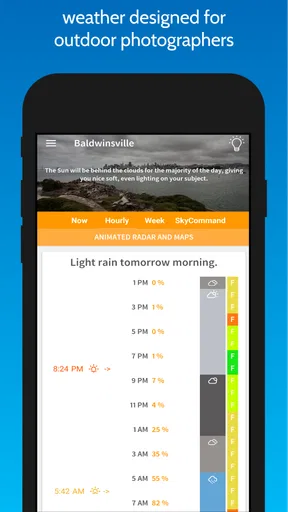
My baseline workflow is simple. I begin by checking the location and looking at the forecast as a sequence of conditions rather than a single temperature. I am not only asking whether the day will be comfortable. I am looking for changes that can affect a photograph: cloud movement, the possibility of rain, the character of the light, and whether the useful window is early, late, or somewhere in between.
This is where the app feels more purposeful than a standard weather widget. The interface is aimed at photographers, so I naturally approach each forecast with a shot in mind. If I am considering a landscape, I want to know whether the sky may provide texture. For street photography, I care more about changing conditions and the chance of wet surfaces or dramatic contrast. For portraits, a forecast that looks exciting on paper may be less useful if the light is too harsh or the conditions are uncomfortable for the subject.
I would not treat any weather app as a promise, and Fotocast is no exception. Forecasts are planning aids, not guarantees. My most reliable habit is to check the app once when I am choosing a day, then again closer to departure. That second look is important because a promising plan can become impractical as the timing or conditions shift. The app works best when I use it to narrow decisions, not when I expect it to remove uncertainty.
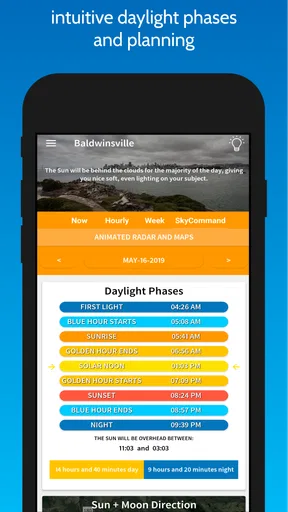
A realistic example is a weekend walk to photograph an old bridge. Instead of leaving immediately because the general forecast says “partly cloudy,” I use Fotocast to think in phases. If the clouds are likely to break around the time I arrive, I may take the longer route and bring a wider lens. If rain appears likely throughout the useful period, I can avoid carrying extra equipment and choose an indoor subject instead. That small change in planning is the app’s strongest everyday benefit.
It is also useful for photographers who work with limited time. Someone who has only an hour after work does not need a complete meteorological briefing; they need to know whether that hour is worth using. I can compare the forecast with the practical demands of the shoot and make a decision quickly. The app becomes particularly helpful when I already know what visual result I want and need weather information to judge the odds.
What to check before trusting a promising forecast
I recommend separating the creative question from the safety question. Fotocast can help me think about conditions for photography, but I would still use an appropriate source for severe-weather alerts, travel disruptions, or decisions involving genuine danger. A beautiful cloud pattern is never a reason to ignore lightning, flooding, strong winds, or rapidly changing conditions.
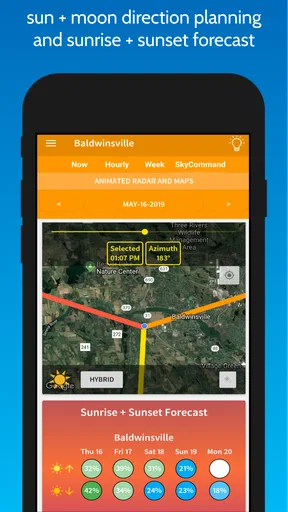
Location choice also deserves care. A forecast that is useful for a city center may not describe a hilltop, coastline, valley, or open field accurately enough for a planned shoot. I try to select the closest relevant location and then allow some flexibility. This is especially important for sunrise and sunset work, where a small difference in local conditions can change the result even when the wider forecast looks encouraging.
Another practical point is to plan for the photograph, not just the forecast. If I am hoping for reflections, rain can be helpful, but only if I can keep the camera dry and still work safely. If I want soft light, cloud cover may help, but a thick, unbroken sky can produce a less interesting image than a forecast with occasional openings. The app gives me a starting point; my experience has to interpret it.
Settings and habits that deserve attention
When I set up a weather app for photography, I first make sure the selected place is the one I actually intend to visit. This sounds obvious, but it is easy to plan around a nearby town while shooting several miles away in terrain with different exposure and weather behavior. I also check the time display and keep my camera schedule consistent with the local time shown by the device.
Fotocast is most useful when I avoid random checking. I prefer a few deliberate reviews: one during planning, one on the evening before a morning shoot, and one shortly before leaving. That routine lets me notice whether the forecast is stable or changing. A stable forecast gives me more confidence in committing to transport and equipment. A shifting one suggests a lighter kit and a backup subject nearby.
The app’s free entry point makes this habit easy to try without committing money at the start. It is listed as free, although in-app purchases range from around two dollars to nearly sixty dollars per item. I would not buy anything simply because I photograph occasionally. I would first establish that the app’s presentation fits my planning style, then decide whether any optional purchase is worthwhile for the way I work.
That is an important distinction for new users. A photographer who only wants a basic temperature and rain check may find a conventional weather app sufficient. Someone who repeatedly plans outdoor sessions may get more value from a focused interface, but the benefit comes from using it often and thoughtfully. The price structure should therefore be considered alongside frequency of use, not in isolation.
For a repeat location, I find it helpful to create a mental checklist around the forecast. I ask whether the light is likely to match the subject, whether the ground conditions will affect access, whether I need weather protection, and whether I have a fallback composition. The app does not replace that checklist; it makes the weather portion easier to integrate into it.
Faster patterns for real shooting days
Experienced use is less about staring at the screen and more about reducing unnecessary decisions. Before a planned shoot, I decide what would make me go, what would make me change the route, and what would make me cancel. For example, light rain might be acceptable for an urban walk but not for a long hike with delicate equipment. A cloudy forecast may be ideal for architecture but disappointing for a sunset landscape.
This approach turns Fotocast into a decision filter. I do not need to memorize every part of the forecast. I only need to identify the conditions that matter for the specific assignment. That keeps the workflow fast and prevents me from overreacting to small changes that will not affect the final image.
I also like pairing the forecast with a fixed departure routine. I prepare the camera bag first, then check Fotocast before adding weather-specific items. If the outlook is dry, I can keep the kit compact. If rain is possible, I add protection and choose a location with shelter. If the light looks uncertain, I bring a lens that gives me more compositional flexibility instead of carrying every option.
For photographers who share a location with another person, the app can support clearer communication. Rather than saying “the weather looks okay,” I can explain why I think the plan is workable: the conditions should be comfortable during the walk, the light may improve later, or the forecast is unstable enough that we should stay close to transport. That makes the decision more practical for everyone involved.
There is another useful pattern for learning. After a shoot, I compare what I expected with what I actually encountered. Was the cloud cover more persistent than expected? Did the useful light arrive earlier? Did rain make the location better or simply harder to work in? I do not need a formal journal to benefit from this. A few notes connected to the forecast can gradually improve my judgement and help me interpret future plans more realistically.
This is one of the app’s non-obvious strengths: it encourages photographers to connect weather with outcomes. A generic forecast is often consumed passively. A photography-oriented forecast invites a more deliberate question—what can I create under these conditions? That mindset is valuable even when the answer is to stay home.
Where the focused approach reaches its limits
Fotocast is not automatically the best replacement for every weather tool. If I need a broad emergency picture, detailed radar analysis, marine information, or a highly specialized local warning system, I would use a service designed for that purpose as well. A photography-focused app can support a shoot plan, but it should not be my only source for serious safety decisions.
It may also feel too specialized for casual users. If I take photographs only when I happen to be outside, the extra focus may not change my behavior. A familiar general-purpose app may be faster for checking whether I need an umbrella or jacket. Fotocast earns its place when weather affects the timing, location, equipment, or creative expectations of a session.
The rating sits at about 3.9 from roughly 350 ratings, with around 75 written reviews. I read that as a sign to keep expectations measured. The app has a clear audience and a useful idea, but a focused concept does not guarantee that every photographer will prefer its workflow. Interface taste, forecast expectations, and the need for broader weather tools will all influence the experience.
Its scale is also modest, with over ten thousand installs, so I would approach it as a specialized utility rather than a universally adopted weather standard. That is not a criticism by itself. Smaller tools can be perfectly worthwhile, but I prefer to keep a general weather option available for cross-checking when a trip, paid assignment, or difficult location depends heavily on conditions.
Compatibility is another practical consideration. The current release is version 3.4.5 and requires Android 8.0 or later. That covers many still-used devices, but anyone with an older phone should check compatibility before planning around it. The app is rated for Everyone, which makes it straightforward to recommend within a household or photography group without age-related concerns.
I would also avoid judging the app solely by whether it predicts the exact sky I hoped for. Forecast accuracy varies by place and timing, and photography itself is unusually sensitive to small changes. A forecast can be useful even when it is not visually perfect, provided it helps me choose a better window, carry the right protection, or prepare an alternative subject.
Who should make it part of a routine
I think Fotocast is best suited to landscape photographers, outdoor hobbyists, travel photographers, and anyone who regularly plans around natural light. It can also help people who are still learning to read conditions because it encourages them to connect weather patterns with photographic choices rather than treating the forecast as a simple yes-or-no answer.
It is less compelling for someone who needs only a quick daily forecast, a full emergency-weather dashboard, or highly technical meteorological tools. In those cases, a mainstream weather service may be more convenient, especially if radar, alerts, and broad location coverage are central to the decision.
For a beginner, my advice is to use the free version long enough to establish a real workflow. Pick one familiar location, check it before several planned outings, and observe whether the app helps you make better choices. Do not purchase optional items until you know exactly which part of your routine they would improve. The best tool is the one that reduces uncertainty without adding another complicated task.
For a more experienced photographer, the app works well as one layer in a larger process. I would combine it with local knowledge, a safety-aware backup plan, and a quick final check before departure. Its focused perspective is most valuable when it changes a practical decision: leaving later, choosing a different viewpoint, protecting equipment, or deciding that a poor forecast may actually suit a particular subject.
After using it this way, my verdict is positive but specific. Fotocast is not a universal weather replacement, and I would not recommend treating it as one. It is a specialized planning companion that makes sense when the weather is part of the creative brief. The strongest results come from combining its forecast view with repeatable habits, careful location selection, and honest expectations about uncertainty.
For photographers who regularly ask whether a trip is worth the effort, that focus can save time and improve preparation. For everyone else, a familiar general weather app may be the simpler choice. I would try Fotocast if photography is the reason weather matters to me, keep a broader source for safety and cross-checking, and judge its value by the quality of decisions it helps me make rather than by how often I open it.
Verdict
Strengths of Fotocast - Weather Forecast fo
- Clear weather forecasts with useful hourly and daily breakdowns.
- Clean interface makes key conditions easy to check quickly.
- Supports location-based forecasts for convenient travel planning.
- Weather details can help users prepare for changing outdoor conditions.
- Lightweight design usually feels responsive on modern devices.
Limitations of Fotocast - Weather Forecast fo
- Forecast accuracy may vary depending on location and data coverage.
- Some advanced features may require a premium subscription.
- Frequent weather updates can increase battery or data usage.
- The app may offer limited value in areas with sparse weather data.
- Notifications could become distracting if too many alerts are enabled.
Other Releases by Dunbar Technology, LLC
View All
SkyCandy - Sunset Forecast App
Weather3.2
Similar Picks in This Category
View All
Weather - By Xiaomi
Xiaomi Inc.4.1

Weather & Radar Forecast
WetterOnline4.8

Weather
OneLouder Apps4.6

AccuWeather: Weather Radar
AccuWeather3.6

The Weather Channel - Radar
The Weather Channel4.6

1Weather Forecasts & Radar
OneLouder Apps4.3
Frequently Asked Questions
What is Fotocast - Weather Forecast for, and how does it work?
Fotocast - Weather Forecast is designed to present weather information in a visual, easy-to-understand format. After selecting a location, users can check current conditions, temperature, precipitation, wind, and upcoming forecasts. The app may use your device location for local updates, while manually added cities are useful for checking destinations, family locations, or travel plans.
How accurate is the weather information in Fotocast?
Forecast accuracy depends on the weather data providers, the selected location, and how far ahead you are looking. Short-term forecasts are generally more dependable than long-range predictions, especially during rapidly changing conditions. Fotocast is useful for everyday planning, but users should still confirm serious weather warnings through official local authorities before making safety-related decisions.
Does Fotocast require access to my location?
Location access is usually optional, but allowing it can make the app more convenient because Fotocast can automatically display weather for your current area. If you prefer greater privacy or want to reduce background location use, you can deny permission and search for cities manually. Review the permission request carefully and choose the setting that suits your needs.
Can I use Fotocast to monitor several cities or plan a trip?
Fotocast can be useful for comparing weather in multiple places, such as your home, workplace, travel destination, or locations where relatives live. Depending on the app version and device, you may be able to save or switch between locations. Forecast details can help with packing and scheduling, although conditions should be checked again shortly before departure.
Is Fotocast free, and does it contain advertisements or in-app purchases?
The availability of free features, advertising, and optional purchases can vary by platform, region, and app version. Before downloading, check the Google Play Store or Apple App Store listing for the current pricing and subscription details. If the app offers premium features, review the renewal terms carefully so you understand whether a purchase is one-time or recurring.
